My favorite free pixel art app just got a big update
Pixelorama's game asset creation tools got an upgrade.

Orama Interactive just announced version 1.1.9 of Pixelorama, an open source pixel art-focused drawing and animation tool that runs natively on Linux. It's the first release in almost four months, it adds a lot of useful functionality to Pixelorama.
What's new
- More export abilities: You can now export sprite sheets with split layers, or export tilesets directly from the Project Properties.
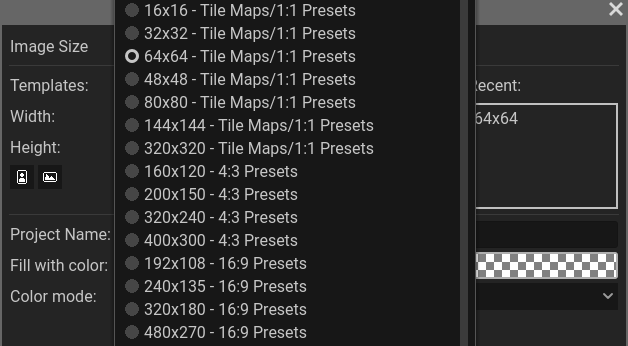
- More project presets: When starting a new project, you now have more aspect ratio presets in the templates list, including for tilemaps and A4/A5 portraits.
- Cel duplication: You can now clone individual animation cels. Right-click the cel to find it in the context menu, or use the
Alt+Dshortcut. - Save prompts on web: The web version of Pixelorama will now send a confirmation request when you try to close the tab without saving changes.
What's getting better
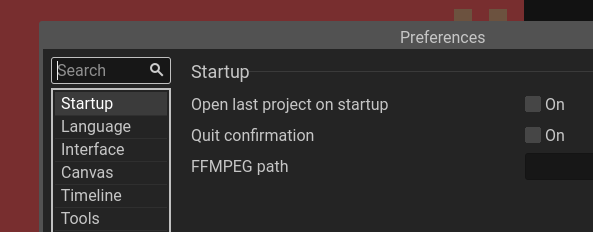
- Finding settings: The Preferences menu now has a search bar. This is essential in some settings menus.
- The mobile experience: The main menu is now collapsed into one menu button on mobile (by default, you can go back in Preferences), and next to the menu button you'll find quick access buttons for save, undo, copy, Shift, and more.
- Privacy on Android: You no longer have to give Pixelorama full access to device storage on Android.
- Finding extensions: The extension browser now lists tags alphabetically, and tags are no longer case-sensitive, simplifying the browsing experience.
Zooming out
Why this update matters: Pixelorama is built with the open source Godot game engine. It also has features that make importing art to Godot in particular easier. Open source game creation tools become very important whenever the big engines raise prices.
My take: I used Pixelorama to make the favicon for my personal website. I'm looking into designing some animations, so I'm glad to see cel duplication making that work easier.
Diving in
The fineprint: There are several smaller updates I left out. If you want to those, check out the v1.1.9 release notes on GitHub.
Get it now: Visit Pixelorama's download page for download options, or go straight to Flathub for the free Flathub release. You can also try the official web app in your browser.