3 Linux app recs for backups, podcasts, and dashboards
This week, we're trying a simple back up app, a podcast feed manager and player, and a customizable dashboard for the terminal.


There's always new Linux software being developed, in addition to many established apps being maintained that Linux pros have been using for decades. Here are a few of those that are worth trying.
Déjà Dup: Simple backups (including cloud)
If you don't back up the data on your Linux computer, you're at risk of losing it completely. One hardware failure or bad update can make it difficult or impossible to recover your data.
Creating backups on Linux is easy though with the GNOME app Déjà Dup, and it allows multiple backup methods. Just open the app, select the folders you want to back up, select a destination, and hit the "Back Up Now" button. You can make the destination a Google Drive or OneDrive cloud storage account, an Rclone service, another network server, or just a local storage device. You can set up automated backups, and, by default, all backups are encrypted with a password of your choosing.
Why I like it
I can tell you from experience, it's a terrible feeling learning you lost important data. But I can also tell you backups can be a pain to set up and remember to do. Déjà Dup has one of the simplest and friendliest interfaces I've tried. I tested backing up and restoring both with Google Drive and with a USB drive attached to my Linux computer, and both worked well.
How to get it
Since Déjà Dup is widely available across Linux repositories, you can probably find it just by searching for its name in your distro's software manager. If you feel brave enough for the terminal, you can also install it with one of these commands:
sudo apt install deja-dup #Debian and Ubuntu
sudo dnf install deja-dup #Fedora
sudo pacman -S deja-dup #Arch
sudo zypper install deja-dup #openSUSE
Kasts: A good podcast app
Podcasts are one of the kinds of media that's still generally free and interoperable (Spotify's colonization aside), and Kasts is a KDE app that's great for subscribing and listening to podcast feeds. After you subscribe to a feed, it's able to show artwork, stream and download episodes, and manage a queue of them. You can "favorite" episodes to easily find them later, and Kasts remembers where you left off so you can easily jump back in.
If you have a gPodder.net account, Kasts is also able to remotely connect to it so your listening is synced. A gPodder account created and synced with a self-hosted Nextcloud instance work as well.
Why I like it
I don't listen to podcasts often, but I liked that I was easily able to export my collection of feeds from my Podverse app on Android and import them into Kasts. I also like how fast its search function works, both for finding feed episodes and for discovering new podcasts.
How to get it
You should be able to find Kasts just by searching for its name in your software manager. Otherwise, you can install it using one of these commands in your terminal:
sudo apt install kasts #Debian and Ubuntu
sudo dnf install kasts #Fedora
sudo pacman -S kasts #Arch
sudo zypper install kasts #openSUSE
Tessera: A modular terminal dashboard
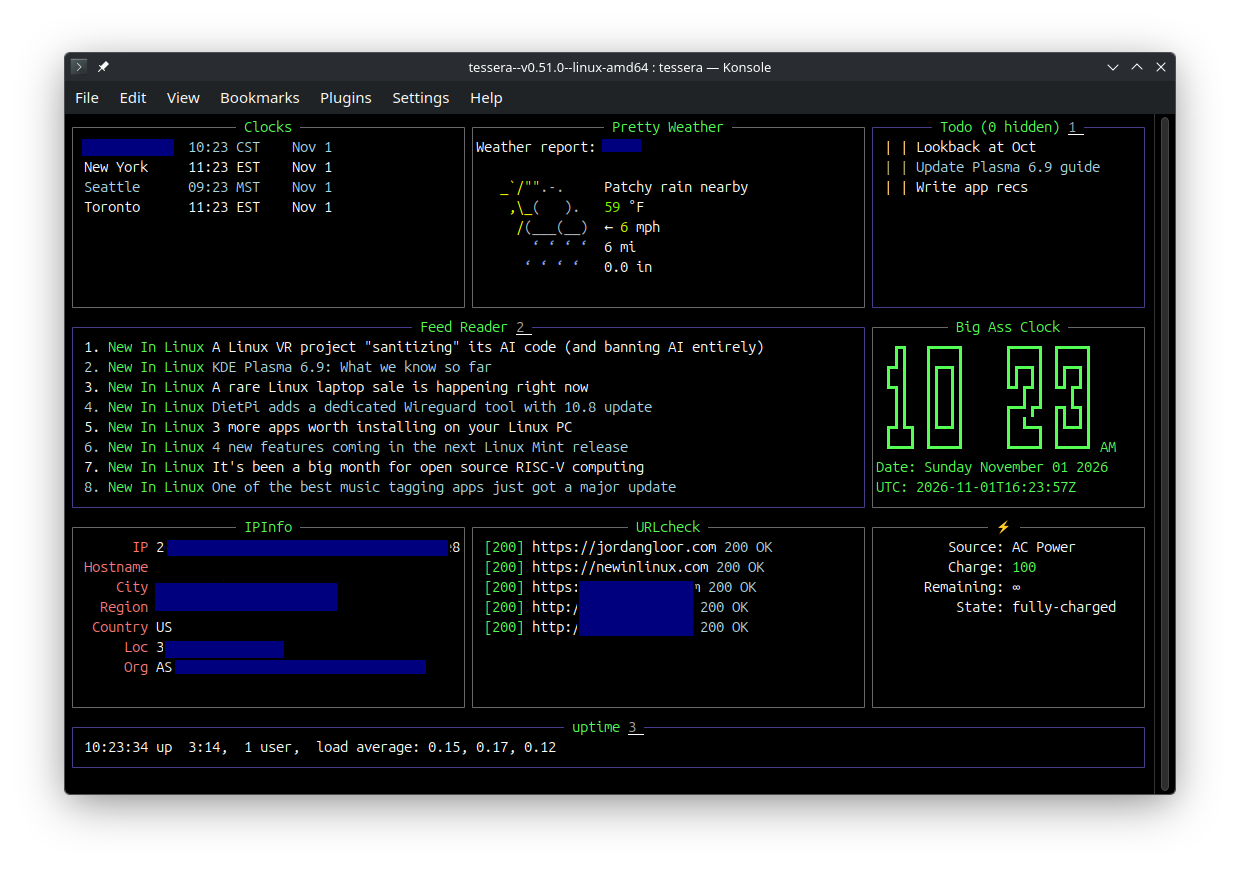
Tessera (formerly known as WTF or wtfutil) is a simple dashboard app for the Linux terminal that lets you build your own dashboard made up of several dozen possible modules that each do something unique. You can manage a to-do list, watch the clock across multiple time zones, monitor your uptime, read the news, track GitHub pull requests, just to list a few modules' capabilities.
Configuring Tessera does require you be comfortable editing a configuration file. It also can take some time to get used to its layout system. Fortunately, there's comprehensive documentation for Tessera explaining how to configure everything.
Why I like it
There are a lot of dashboard terminal interfaces out there, but I like how flexible yet unassuming Tessera is. Many of its modules are built for home-labbing enthusiasts, which I also appreciate.
 Jordan Gloor
How to get it
Unfortunately, Tessera isn't packaged and distributed as widely as other apps on this list. If you happen to have the Homebrew package manager installed on your Linux PC, you can install it with the command brew install wtfutil. (Its package name is still using Tessera's old name.) Otherwise, you can download the latest compiled binary from the WTF GitHub release page, extract it, and run the executable with the ./tessera command.
Those are all the recommendations I have for this week, but you can check out the archive of NIL app recs to get more.