DietPi adds a dedicated Wireguard tool with 10.8 update
DietPi's built-in network manager got a lot of updates as well.


The DietPi development team announced this week the release of DietPi 10.8. Following on the heels of DietPi 10.7, this update came with several enhancements, and these are the highlights.
What's new
- WireGuard configuration tool: There's a new
dietpi-wireguardtool designed just for managing WireGuard servers and clients. It works with both WireGuard servers installed with DietPi's installation scripts and with those installed manually. - Quartz64 disc drive support: You can now use CD, DVD, and Blu-ray drives connected over ATAPI or SCSI on PINE64's Quartz64 single-board computers.
What's getting better
- Installing HAProxy: The DEB package for HAProxy, an open source software that provides load balancing and proxy services, is now hosted by the DietPi team itself rather than Debian. This means installing and updating a HAProxy instance should be both faster and simpler.
- Network management: The
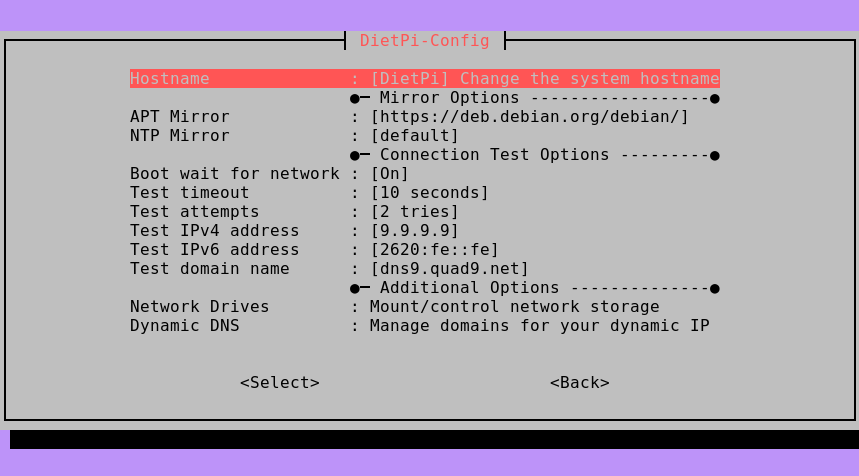
dietpi-networktool saw several bug fixes and improvements. Issues with connecting to and modifying the settings of hotspots and with invalid characters being accepted were resolved, to name a few. - Hostname configuration: To better organize options in the
dietpi-configinterface, the option to change the hostname has been moved from the "Security Options" menu to the "Network Options: Misc" menu.
What's going away
- Software ID numbers: Now when you're listing software you want DietPi to automatically install for you, its ID is its name with all capitalization and punctuation removed from it. Previously, every software DietPi could automatically install was assigned a number, and you had to input that number in automation scripts. Now, you call it by its name, like
noderedfor Node-RED instead its old code,122.
Zooming out
Why this update matters: DietPi remains one of the best options for making efficient use of a single-board computer like a Raspberry Pi. It's also one of the Linux distributions officially supporting RISC-V computers.
My take: I'm glad the number codes are being done away with, it was sort of cumbersome looking up codes just to tell DietPi what you wanted to install.
 Jordan Gloor
Diving in
The fineprint: If you want all the details, including a bunch of bug fixes and more minor updates, read the official DietPi 10.8 release notes.
Get it now: If you already have DietPi installed, you can upgrade now by running dietpi-update. If you're new to the SBC-optimizing distribution, you can download an image for your board now by going to the DietPi download page.