4 new features coming in the next Linux Mint release
New tools for monitoring your system, reading eBooks, and creating calendars are all expected in Linux Mint 27.


Linux Mint 27 (formerly known as Mint 23) is expected at to arrive December 2026. In addition to Mint's Wayland support announced in April, there are several brand new features you can expect when the release nicknamed "Adrien" gets here. I tried early versions of four of them, and this is what they currently look like.
Why it's important: Linux Mint is one of the most popular Linux distributions, especially people who are coming over to the open source operating system from Windows.
- The developers themselves are expecting a lot from this release, as Clem remarked on the Linux Mint October update blog, "I don’t think I’ve ever seen so many changes and new features implemented for a single release. It’s really exciting and it scares me a little bit because that also means we’re going to be very busy during the beta phase."
A custom book reader
Linux Mint 27 will come packaged with a new app for reading eBooks, specifically EPUB files. It'll have bookmarks and search engine for finding specific text in the eBook. It also gives you a shortcut to look up the definition of words online.
- You can even configure custom search engines if you have a preferred website to lookup dictionary terms.
A new calendar suite
Linux Mint's current calendar system, an old version of GNOME Calendar, is set to be replaced by an in-house calendar and time management suite nicknamed "Clockenstein." It encompasses both time synchronization and the clock and calendar widget built into the task drawer.
- You can sync Google Calendar or other CalDAV calendars with it—multiple, simultaneously if you want. Of course, you can also just keep your calendars offline inside your desktop.
 Jordan Gloor
Desktop alarms
In case you fancy alarms built into your Linux Mint desktop, a new addition to the clock is an alarm system. According to the Mint development team, "The application takes inspiration from Android," so anyone used to setting alarms on an Android phone or tablet will be familiar with how it works.
- You can create multiple alarms and then toggle their operation off and on. Each alarm can also have a unique notification sound, which repeats every number of seconds you define. When the alarm goes off, a dialog box opens up with the name of the alarm and the option to dismiss it.
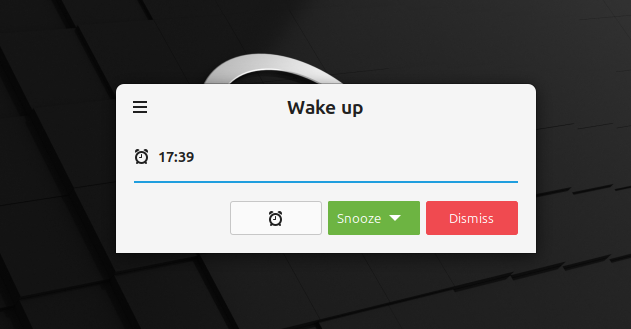
- This is part of the wider Clockenstein suite, although at the time of writing the Calendar app and Alarms app appear in the desktop as separate pieces of software.
(Unconfirmed) A new system monitor
Mentioned in the October Mint blog post was that we'll hear soon about "Superlight, Unfold, and Velocitty." Looking at the XApp project on GitHub, those are apparently a new system monitor app, an archive manager, and a new terminal. I tried installing all three, but I could only get Superlight to work.
- Considering all three are still in nascent stages of development, and that they've not had formal introductions on the Mint blog yet, there's a chance they won't actually appear in the final Adrien release.
Trying out Superlight, though, it looks like a powerful monitor for not just system processes but also storage consumption. The various views in the resource monitor, including overall usage, CPU cores, Network, and Disk, are all collapsible. You can switch to Apps and Processes views where you can stop or kill processes that are giving you grief. In the Storage view, you can instantly find out what folders are using the most real estate on your hard drive.
Looking forward to these additions for Linux Mint 27? There are no specific dates for either the beta or the full release, but we do know that they're generally expected close to Christmas. Until then, subscribe to the NIL newsletter to stay in the know about major distro releases and app recommendations.