3 useful Linux apps that make productivity easy
This week I'm exploring Linux apps for office work, including a no-frills grammar checker, a CLI-based to-do app, and a tablet-friendly note-taking app.


Installing Linux on your desktop is one job, but what do you do when you actually get there? You can be productive with office tools, but knowing what Linux apps to use is a challenge. Let me show you a few neat ones.
Eloquent: Simple, offline grammar assistance
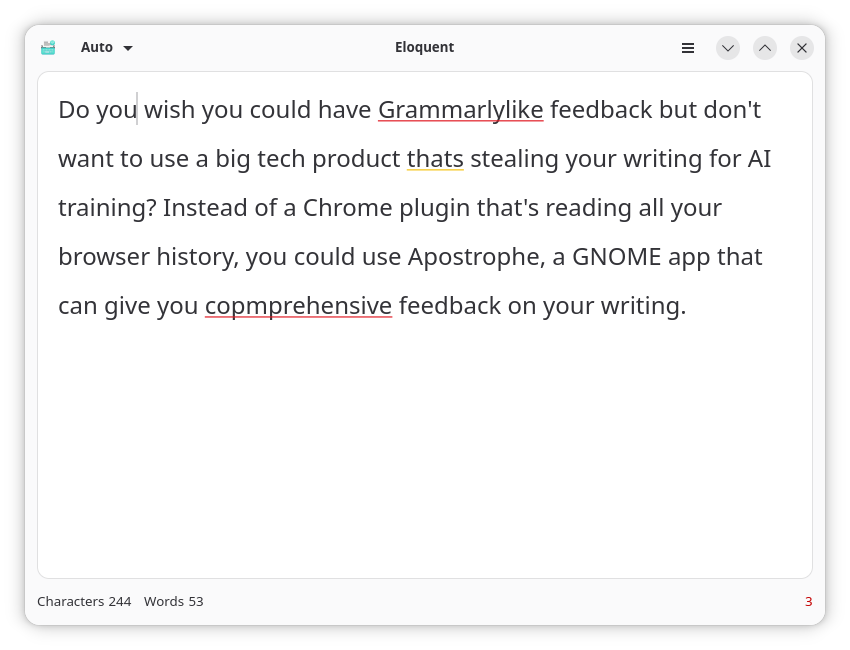
Do you wish you could have Grammarly-like feedback but don't want to use a product from big tech that's stealing your writing for AI training? Instead of a Chrome plugin that's reading all your browser history, you could use Eloquent, a GNOME app that gives you comprehensive feedback on your writing.
Simply write or paste your text into Eloquent's input field, and it automatically identifies the language (from a couple of dozen supported languages) and begins underlining to highlight how you could spell or phrase words better.
Why I like it
Eloquent goes beyond the spelling mistakes and missing punctuation that something like LibreOffice Writer would catch. It suggests corrections for wordiness, repetition, and redundancy. It can even tell me when I named the wrong of the week for a specific date in history.
Best of all, Eloquent works offline rather than connecting to remote servers where my writing is processed by who-knows-what. I also like the built-in word and character count, which are useful tools for me in the final review process of promotional copy.
 Jordan Gloor
How to get it
Eloquent is available only from Flathub, which means your Linux software browser will make it available so long as it's connected to Flathub.
Taskwarrior: To-do lists in your terminal
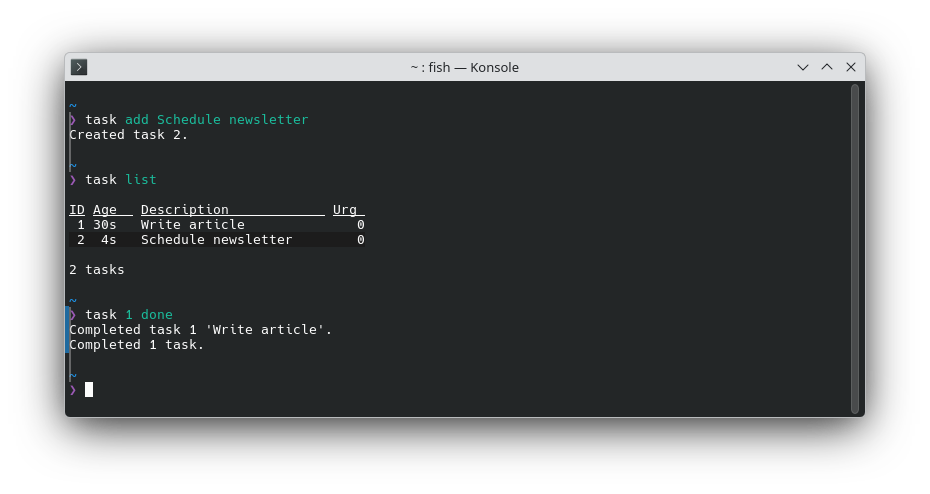
Do you enjoy accomplishing tasks from the command line? Or maybe the to-do app you've been using is more graphically-intensive than you really need it to be? Consider Taskwarrior, a deceptively simple terminal-based application for managing a to-do list.
By default, there's no text-based user interface to learn. Instead, you have only simple commands like task add Write article to add "Write article" to your list, task list to see your list, and task 1 done to mark the first item on the list as done. There are many flags and options you can learn to do more complicated task management, but those three commands will get you started with the concept.
Why I like it
Taskwarrior is part of that rare breed of software that's easy to start using from the get-go yet can be incredibly powerful and versatile if you dig into the extra features. Tags, deadlines, and APIs for integration with other software let me build a much more advanced workflow. In other words, I can be as much of a power user as I want to be.
How to get it
You can find Taskwarrior across Linux software repositories. Here are some of the most common installation commands:
sudo apt install taskwarrior #Debian and Ubuntu
sudo dnf install task task #Fedora
sudo pacman -S task #Arch
sudo zypper install taskwarrior #openSUSE
Xournal++: A note-taking multi-tool
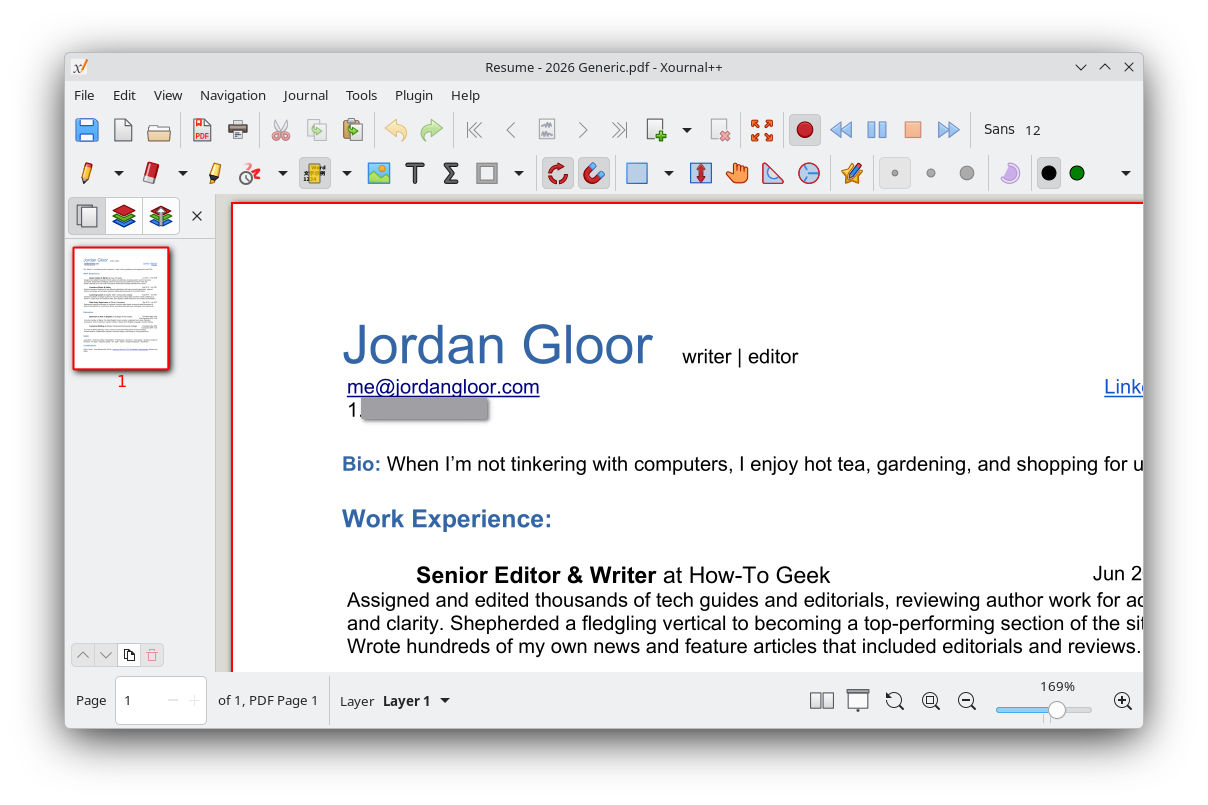
If you have a drawing tablet that connects to your Linux PC, a great way to make use of it is to install Xournal++. Its primary purpose is handwritten note-taking, with easy-to-use drawing and highlighting tools. By default, it gives you a ruled note page to write on, but you can import any PDF and draw or type on it. Then, with a plugin enabled, you can export it as a completed form or whatever else you want to annotate.
Xournal++ also gives you some neat extra tools like in-document audio recording, plus LaTeX and geometry tools. The app is designed to work with touchscreens as well.
Why I like it
I'll be honest: I don't have a graphics tablet. Still, good PDF editing tools are hard to find on Linux, and Xournal++ is one of them. It makes typing into blanks on a PDF, regardless of whether there's an actual text box, super easy.
How to get it
The Xournal++ app is widely available across Linux distributions. Just search your software browser for "xournal," and it ought to come up. Otherwise, you can visit the official Xournal++ installation guide for other formats (like an AppImage), or you can install it from your terminal with one of these commands.
sudo apt install xournalpp #Debian and Ubuntu
sudo dnf install xournalpp #Fedora
sudo pacman -S xournalpp #Arch
sudo zypper install xournalpp #openSUSE
I write Linux recommendations every week, so if you didn't find a useful one here, check out the archive for more. Also be sure to subscribe to the New In Linux newsletter so don't miss the next one.