Copy Fail: A simple guide to staying safe on your Linux desktop
You can confirm that you're secure with a simple check of your system info.


Heard about the Copy Fail exploit but aren't sure if you're in danger or how to keep your Linux desktop secure? Here's a simple way to understand the issue and make sure you're patched against the issue.
What exactly is Copy Fail?
In short: The Copy Fail exploit allows a non-root users on a Linux system (using a kernel from 2017 and later) to gain root access without knowing the password. Essentially, anyone with access to your computer can take control of the system even if you're using a strong password.
Who's affected: Because this exploit requires the bad actor to already be logged into a user account on your computer, you don't need to worry on regular a Linux desktop so long as you aren't literally handing your PC over to strangers.
If you're running a Linux server, you're affected if your services allow remote users to run code, such as JupyterLab. More advanced server types like container clusters and build farms are also affected.
More specifically, Linux distros running these kernels are affected:
- 5.10 LTS
- 5.15 LTS
- 6.1 LTS
- 6.6 LTS
- 6.12 LTS
- All kernels going back to 2017 that have reached end-of-life status
Staying secure
To make sure you're not in danger, you should first check what kernel you're using. You can often find this out by looking at the system info view in your Linux computer's settings menu.
For example, KDE Plasma's "About This System" dialog on CachyOS shows that I'm running CachyOS' variation on kernel version 7.0.3. Since kernel 7.0 and above aren't affected, I know I'm safe!
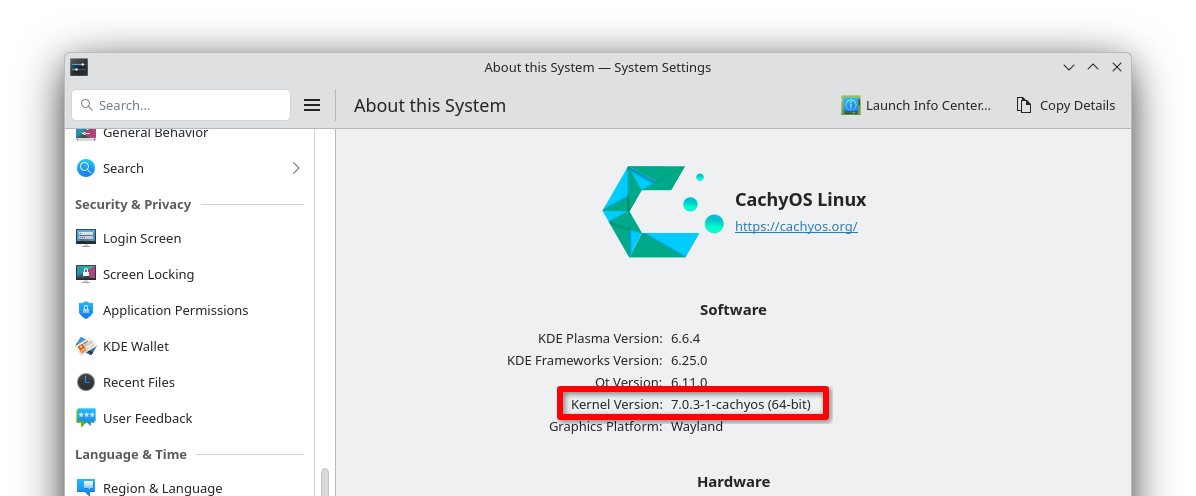
If you're having trouble finding your kernel version in your desktop environment, you can always run this short command in a terminal to pull up the kernel name:
uname -rIf your kernel version number is lower than 7.0, don't panic. Many distros have already issued patches (small fixes) for an LTS kernel you're probably using.
Check the first decimal point in the version number. Match it to one of these LTS kernels and then look in the column next to it to confirm you're on the patched (read: secure) version of that kernel.
| LTS Kernel | Patched Version |
|---|---|
| 5.10 | 5.10.254 and above |
| 5.15 | 5.15.204 and above |
| 6.1 | 6.1.170 and above |
| 6.6 | 6.6.137 and above |
| 6.12 | 6.12.85 and above |
If your system reports an earlier version of one of these kernels, update your system immediately and reboot to confirm the change takes effect. If you check again and your kernel still doesn't appear to be patched, contact your distro's maintainer for help.
Zooming out
Why this announcement matters: Copy Fail is one of the biggest and widest-ranging CVE reports in recent memory. It affects Linux specifically, the most-used operating system on the planet.
Go further: There's a website dedicated to information about Copy Fail you can visit for more technical details and explanations.
The bottom line: An up-to-date computer is a secure computer. Don't delay those updates, folks.